
Reservations Instructions

Downloadable Reservation Instructions

You must have an active and approved Rec Trac account with child/children’s enrollment completed.

Use the link to go to REC TRAC

  1. Sign-in to your Rec Trac account.
  2. Click the gray box on the HOME page: CLICK TO MAKE DROP-IN RESERVATION
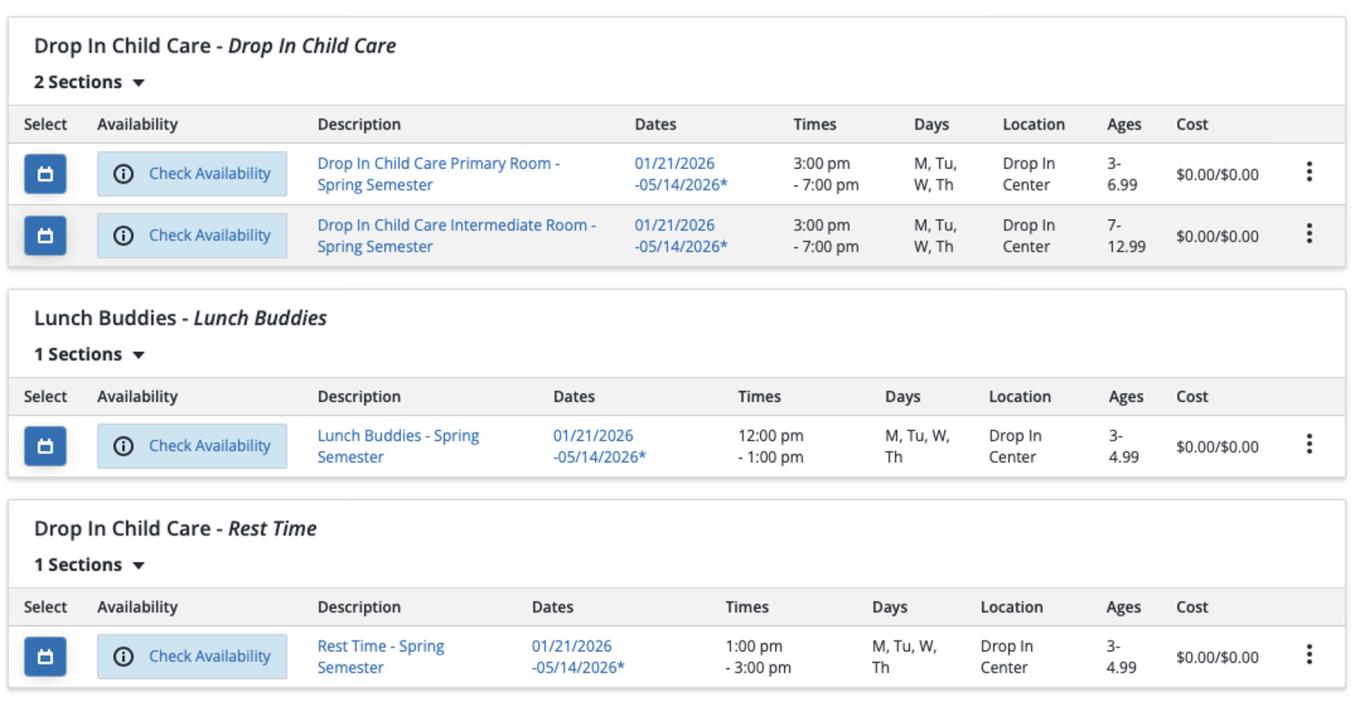
  3. The reservation page will have 3 options:
    • Drop-In Child Care - (Primary Room (ages 3-6) & Intermediate Room (ages 7-12))
    • Drop-In Lunch Buddies – (Primary Room ages 3-4 only, parent-provided lunches meeting Lunch Buddies required guidelines only)
    • Drop-In Rest Time – (Primary Room ages 3-4, see Rest Time required guidelines)
      Image
      RecTrac reservation instructions visual guide
  4. Select the desired drop-in service, add dates, drop-off and pick-up times. Each child must have a separate reservation. Advanced reservations are highly recommended and can be made for a single occasion or regularly for the entire semester. If a student-parent/guardian is attending an on-campus event outside of their current academic schedule on file, (i.e. scheduled event, study session, meetings with university faculty or staff) the student-parent/guardian is required to inform the Center staff of their on-campus location at the time of drop-off. Parents/guardians are required to remain on the CCSU campus when using the free child care support services.
  5. All on-line reservations must be made with a minimum of 24 hours’ notice. Same-day reservation cannot be made through your Rec Trac Account. In the event of an emergency, same day reservations can be requested by calling the classroom phone directly: 860-832-2103 and leaving a message on the answering machine. The message must include the parent/guardian’s name, phone number, reservation request, child’s name and age. A staff member will return your call as soon as possible. If space is available and appropriate ratios can be maintained, a staff member will call to confirm your emergency request.

UPDATED 1-6-26